
Slack can still be working for your team when you start wondering whether something else might fit better.
Perhaps the subscription has become harder to justify. Maybe your team has more channels than anyone can reasonably follow, or important decisions keep disappearing beneath another day’s messages. And sometimes the problem isn’t communication itself. People are talking, sharing updates, and making requests, but nobody is quite sure who’s responsible for what happens next.
That’s usually when the search for Slack alternatives begins.
The good news is that there are plenty of options. The less convenient news is that they don’t all solve the same problem. Some offer a familiar messaging experience at a lower price. Others bring conversations closer to tasks, documents, and projects. A few give organizations more control over their infrastructure and data.
The best Slack alternative depends on what your team actually needs to improve: cost, ease of use, task management, integrations, or control over how information is stored and shared.
For teams that want everyday chat and assigned work in one place, Chanty is worth considering. Microsoft Teams and Google Chat make sense if your company already relies on their respective ecosystems. ClickUp and ProofHub are better suited to organizations looking for more structured project management, while Rocket.Chat deserves attention when deployment control is a priority.
Our Top Picks



We’re the team behind Chanty, and we’ve spent years exploring how different collaboration tools approach the same everyday problems. Some of the observations in this guide come from our earlier hands-on testing, while current features and pricing are discussed separately.
Naturally, we have our own perspective. We’ve included Chanty where we believe it fits, but we’ll also explain when another platform, or simply staying with Slack, might make more sense.
You don’t need to evaluate every app on this list. Just the ones that could make the difficult part of your workday easier.
Slack alternatives – quick overview
- Chanty – Simple team chat with built-in task management and unlimited message history.
- ClickUp – All-in-one platform combining chat, tasks, docs, and goals.
- ProofHub – Team messaging with advanced project management features.
- Rocket.Chat – Open-source, secure, and self-hosted for full control.
- Pumble – Free forever plan with unlimited users and message history.
- Clariti – Context-based conversations integrating email and chat.
- Fleep – Combines team messaging with built-in task management and email support.
- Flock – Chat plus productivity tools like notes, to-dos, and polls.
- Microsoft Teams – Powerful integration with Microsoft 365 tools.
- Ryver – Team chat with task boards and workflow automation.
- Google Chat – Seamless integration with Gmail and Google Workspace.
Slack alternatives side-by-side comparison
A long list of collaboration tools can be misleading. A project management platform may include chat, but that doesn’t automatically make it a direct replacement for Slack. Likewise, a messenger with inexpensive subscriptions may become less attractive when you account for missing integrations or administration features.
Here’s how the eleven options compare.
| Tool | Best fit | What to examine before switching | Free access and pricing |
|---|---|---|---|
| Chanty | Team chat with built-in task management | Required integrations and the plan needed for team size, calls, and controls | Free for up to 5 members; paid plans |
| Microsoft Teams | Chat, meetings, and Microsoft 365 collaboration | Your exact license and guest-access setup | Teams Essentials: $4/user/month, paid yearly; other plans vary |
| Google Chat | Messaging alongside Gmail, Drive, and Docs | Business administration and Workspace edition | Personal-account access available; business use through Workspace |
| Pumble | Chat with unlimited free message history and users | Calling, storage, and integration requirements | Free plan; Pro: $2.49/seat/month, billed annually |
| Flock | Messaging with polls, notes, and reminders | Searchable history and channel restrictions | Free Starter; see paid plans |
| Ryver | Messaging and task management | User-band pricing and calling requirements | 14-day trial; paid plans |
| ClickUp | Communication within a project management workspace | Setup, Chat limits, and the full subscription | Free plan; paid plans |
| ProofHub | Project planning, discussions, and file approvals | Project/storage limits and required plan | Trial; Essential: $45/month, billed annually, unlimited users |
| Rocket.Chat | Control over deployment and infrastructure | Licensing, hosting, maintenance, and security configuration | Edition-dependent; see current plans |
| Clariti | Connected email, chat, and relationship context | Whether its broader workflow matches your needs | Free entry advertised; confirm current paid terms |
| Fleep | Team messaging with email participation | External collaboration and account administration | Two-week trial; Business: €5/user/month, billed annually |
The most useful comparison is not necessarily the cheapest plan advertised on a website. It’s the plan that includes everything your team needs, for the number of people who will actually use it.
For that reason, we’ll look at each product’s strengths alongside the limitations worth examining before you switch.
Why do companies look for Slack alternatives?
Slack has earned its place in workplace communication. Channels help organize discussions, search makes earlier conversations easier to recover, and integrations connect tools people already use. Its ecosystem can be particularly valuable to companies running many connected workflows.
Still, a useful tool isn’t necessarily the best fit for every organization.
1. The subscription costs more than the team needs
Per-user pricing is manageable when a company has a handful of employees. With a larger team, the monthly bill becomes harder to ignore.
And while Slack offers plenty of advanced capabilities, not every organization needs the full collection.
A small company may only want reliable messaging, calls, searchable conversations, and somewhere to assign follow-up work. Paying for a broader package makes less sense if those additional features rarely get used.
Before switching, compare the actual subscriptions your team would need. Include guest access, storage, administration, integrations, and any paid extras.
2. Older conversations are difficult to access
Slack’s free plan provides access to the most recent 90 days of message and file history. Content older than one year is deleted under its free-plan policy; retention settings also affect what is kept. See Slack’s free-plan limitations.
That matters when a team needs to revisit a client instruction, onboarding discussion, or earlier decision. Hidden history and permanently deleted history are different things. Upgrading cannot recover information that has already been deleted.
3. Conversations don’t always become action
Consider a familiar situation. Someone posts a message asking for an update to the onboarding checklist. Three colleagues respond. A few details get clarified, and everyone moves on. A week later, the checklist hasn’t changed.
Nobody deliberately ignored the request. It simply never became anyone’s responsibility.
Slack offers Lists on paid plans, so it would be inaccurate to say it has no task management. The useful comparison is how each app connects a conversation to an owner, deadline, and visible progress.
4. Too much communication becomes another problem
Channels multiply. Notifications arrive throughout the day. A discussion starts in one place, continues in a thread, and eventually moves into a private conversation. The information exists somewhere, but finding it requires more effort than it should.
Changing platforms won’t automatically solve poor communication habits. However, a simpler interface, better organization, or more direct connection between messages and tasks may help. Test whether a new platform reduces the effort of staying informed instead of recreating the same confusion in another sidebar.
5. Security and administration requirements change
An agency may need controlled client access and file approvals. A retail group may need safe sign-in on shared devices. An IT team may need alerts from its incident system. A healthcare organization may need contractual coverage and access controls for its intended use.
These are different requirements. “Secure,” “all-in-one,” and “easy to use” don’t tell you whether the app can handle them.
Write down what must work before you compare the rest.
Best Slack alternatives for everyday team communication
These tools are the closest place to start if you still want a team messenger at the center of the workday.
Chanty |
Best for: teams that want straightforward staff communication with built-in task management.
At Chanty, we’ve always been interested in a particular problem: what happens after someone sends a message?
Best for: Teams that want straightforward staff communication with built-in task management.
At Chanty, we’ve always been interested in what happens after someone sends a message. Most workplace conversations are fairly ordinary: a colleague asks a question, shares a file, requests an update, or needs someone to take care of a task. The difficulty often comes afterward, when that request becomes another thing everyone assumes someone else is handling.
That’s the problem we’ve tried to address with Chanty. Our platform combines team chat, audio and video calls, shared files, and task management, giving employees a place to communicate while keeping the resulting work within reach.
Chanty vs. Slack: what’s the difference?
Both Chanty and Slack help teams organize conversations, share files, and stay connected throughout the workday. The main difference is how they approach the work that comes out of those conversations.
Slack offers a large integration ecosystem and Lists on paid plans, making it a strong choice for organizations with established workflows across several applications. At Chanty, we’ve taken a more focused approach. Employees can turn messages into assigned tasks and use built-in Kanban boards to track progress without leaving the workspace.
For a small business or operations team handling dozens of everyday requests, that connection can make responsibilities easier to follow. However, companies relying on specialized integrations and complex automation should compare those capabilities carefully before switching.
Where Chanty helps
Imagine an operations manager asking the team to update next week’s onboarding instructions. Instead of copying the request into another application or hoping someone remembers it, a colleague can turn the message into a task, assign an owner, and continue discussing the work in the same workspace.
For a clearer view of progress, Chanty also offers a Kanban board, where tasks can be organized and moved between stages.
This approach is particularly useful for administrative teams, service businesses, and departments where work regularly begins as a conversation rather than a formal project.
Other everyday capabilities include:
- Channels, direct messages, and threads to keep team discussions organized.
- Built-in task management to assign responsibilities and track follow-up work.
- Kanban boards to visualize tasks and their progress.
- Unlimited searchable message history to revisit previous instructions and decisions.
- Audio and video calls, voice messages, and file sharing for situations where typing another explanation isn’t the most practical option.
The goal is to make communication and coordination part of the same process, without requiring everyone to manage a separate project system for ordinary requests.
Where Chanty may fall short
We also know that Chanty won’t replace every part of a larger collaboration ecosystem.
Slack has a broader collection of integrations, which matters to engineering and support teams running custom bots, incident alerts, or complex ticketing workflows. Before switching, check whether Chanty supports the specific applications and actions your team relies on.
It’s also worth considering how much project management structure you need. Chanty’s built-in tasks and Kanban view work well for everyday coordination, but teams requiring advanced portfolio planning, resource allocation, or complex dependencies should evaluate those requirements separately.
Healthcare organizations have additional considerations. Chanty can support routine staff coordination, but an assigned task is not a substitute for clinical escalation or on-call routing. HIPAA support and a BAA are listed from Business, not Free, and organizations should confirm the agreement, configuration, and intended use before handling PHI.
Choose Chanty if: Your team wants conversations, calls, files, and everyday follow-up in one place without introducing a complicated project management system.
You can try Chanty with a real request: start a conversation, turn a message into a task, and see how easily your team can follow what happens next.
Pumble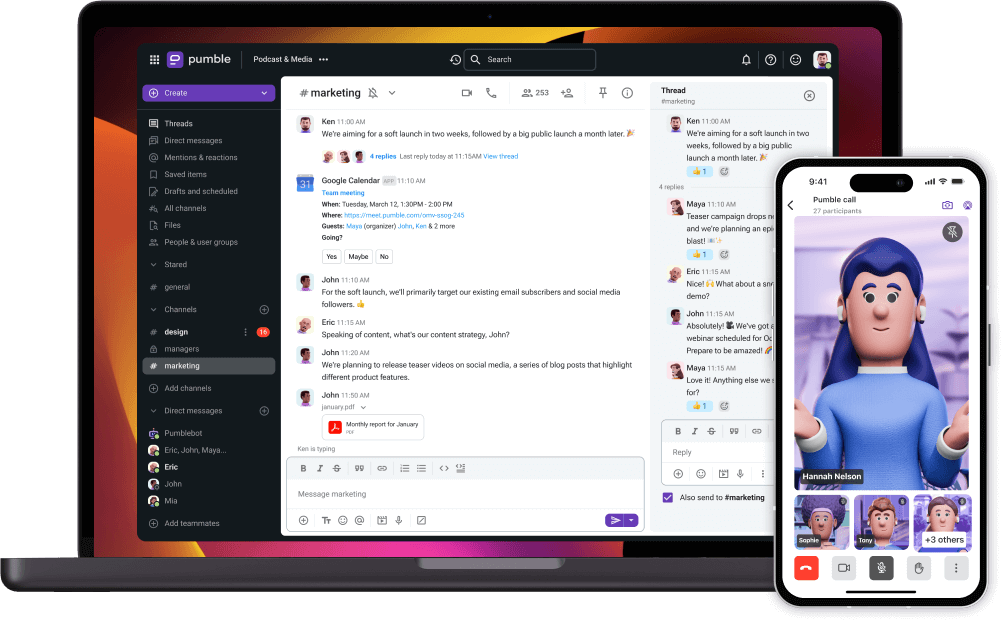 |
Best for: Teams that want familiar messaging with unlimited free users and message history.
If your main frustration with Slack is paying to accommodate more people or access older conversations, Pumble is worth a closer look. Its free plan includes unlimited users and message history, alongside channels, direct messages, and one-to-one meetings.
For a growing team that primarily needs a shared place to communicate, those allowances can make a meaningful difference.
Pumble vs. Slack: what’s the difference?
Pumble is one of the more direct Slack alternatives because it follows a similar channel-based messaging approach. The most noticeable difference is what each platform includes for free.
Slack limits accessible message and file history on its free plan, while Pumble offers unlimited users and message history without a subscription. This makes Pumble attractive to growing teams that need to keep conversations accessible but aren’t ready to pay for every employee.
Slack has a broader integration ecosystem and more established collaboration workflows. Pumble can connect messages to tasks through Plaky, but teams looking for built-in project management should remember that this involves a separate application.
Where Pumble helps
Pumble follows a familiar team messaging approach, so employees accustomed to Slack should recognize much of the basic experience. A small service company or nonprofit, for example, could use it to keep daily questions, announcements, and files accessible without immediately committing to a paid subscription.
Its main advantages include:
- Unlimited users and message history on the free plan.
- Channels and direct messages for everyday communication.
- One-to-one voice and video meetings.
- Integration with Plaky for connecting messages with project tasks.
That last point deserves attention. Pumble can turn a message into a Plaky item and bring project updates into chat, so it would be misleading to describe the platform as having no connection to task management.
Where Pumble may fall short
The difference is that task management depends on a separate Plaky workspace. For teams trying to reduce the number of applications they maintain, that may be less convenient than having tasks directly inside their messenger.
Group meetings and screen sharing also require a paid plan. Agencies and organizations working with external collaborators should check the subscription needed for guest access and permissions.
Choose Pumble if: Your priority is affordable messaging for a growing team, and you’re comfortable using a connected application for more structured project work.
Flock |
Best for: Teams that want messaging with lightweight productivity tools.
Not every coordination problem calls for a full project management system. Sometimes employees need a quick poll about meeting availability, a shared note, or a reminder that won’t disappear beneath another conversation.
Flock brings these small productivity features into the messaging environment, making it an interesting option for teams that want to handle everyday coordination without constantly opening another application.
Flock vs. Slack: what’s the difference?
Both Flock and Slack offer channels, direct messaging, and integrations, but they approach everyday productivity somewhat differently. Slack has a broader integration ecosystem and more advanced collaboration options, while Flock puts simple tools such as polls, reminders, and notes close to conversations.
For a small office team, this can be convenient when most coordination involves quick decisions rather than complex projects. However, Flock isn’t necessarily a better choice for teams leaving Slack because of message history restrictions. Its free plan also limits searchable conversations.
Where Flock helps
Flock includes features such as:
- Team channels and direct messages.
- Polls for gathering quick decisions.
- Notes and reminders for everyday coordination.
- Audio and video communication, depending on the plan.
These additions are most useful when they replace something employees already struggle with. A poll that saves several rounds of scheduling messages has a clear purpose, while another feature nobody uses adds little value.
Where Flock may fall short
Flock’s Free Starter plan lists 10,000 searchable messages, 10 public channels, and 5GB of team storage. That makes message history an important consideration for teams leaving Slack specifically because they want access to older information.
Private channels are available on paid plans, which matters to HR and management teams handling conversations that shouldn’t be visible to everyone. Paid group video calls are also listed for up to 20 participants, so larger distributed teams may need a separate meeting solution.
Choose Flock if: Your team regularly uses polls, notes, and reminders, and its channel, history, and meeting limits fit your working habits.
Microsoft Teams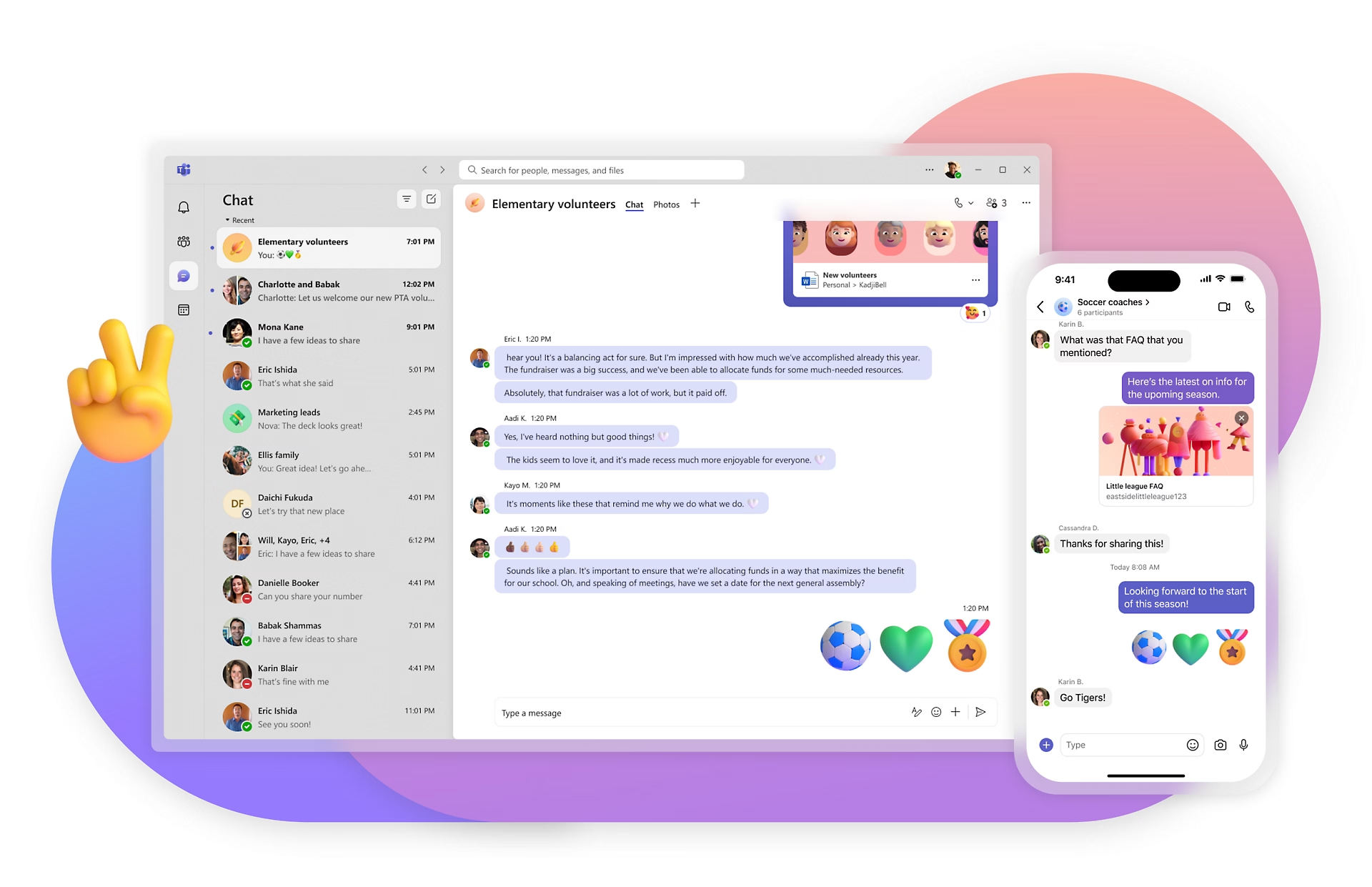 |
Best for: Organizations that want communication connected to Microsoft 365.
If your employees spend most of their day in Outlook, Word, Excel, and SharePoint, the strongest reason to consider Microsoft Teams is already part of your working environment.
Teams connects messaging, meetings, documents, and administration with Microsoft’s wider ecosystem. For organizations that already rely on those applications, it can reduce the need to introduce another communication provider.
Microsoft Teams vs. Slack: what’s the difference?
The main difference between Microsoft Teams and Slack is how they fit into the rest of your working environment. Slack acts as a communication hub connecting numerous third-party applications, while Teams is closely integrated with Microsoft 365.
For a company that regularly collaborates on Word documents, manages files in SharePoint, and schedules meetings through Outlook, Teams can keep those activities connected. Slack may be more attractive when employees use a wider variety of applications and depend on its extensive integration ecosystem.
Neither approach is automatically better. The deciding factor is whether your company benefits more from Microsoft integration or the flexibility of Slack’s broader app ecosystem.
Where Microsoft Teams helps
A professional services company working on shared client documents can keep conversations close to the files employees are editing. Meetings and collaboration also fit into the same environment, making Teams particularly relevant when Microsoft 365 already supports much of the company’s work.
Its advantages include:
- Integration with Microsoft 365 applications and documents.
- Team channels, messaging, and meetings.
- Document collaboration through Microsoft services.
- Administration and identity management within the Microsoft environment.
- Shared-device configurations for certain frontline workflows.
That last capability is worth examining for retail, hospitality, and other shift-based organizations. Microsoft provides guidance for shared devices, although the setup needs to be evaluated rather than assumed to work automatically.
Where Microsoft Teams may fall short
The broader Microsoft environment also requires planning. Licensing, account management, permissions, and external access can introduce additional administration, especially for smaller businesses without dedicated IT support.
Companies working with clients should test the complete collaboration process, from inviting an external participant and sharing a document to removing access when the project ends.
For shared devices, the important question isn’t simply whether the app can be installed. Employees need a reliable way to sign in and out without exposing the previous user’s information.
Teams Essentials is listed at $4 per user per month when paid annually. Other Microsoft 365 subscriptions vary, and not every package includes Teams.
Choose Microsoft Teams if: Your organization already depends on Microsoft 365 and can benefit from keeping communication, meetings, and documents within that environment.
Ryver
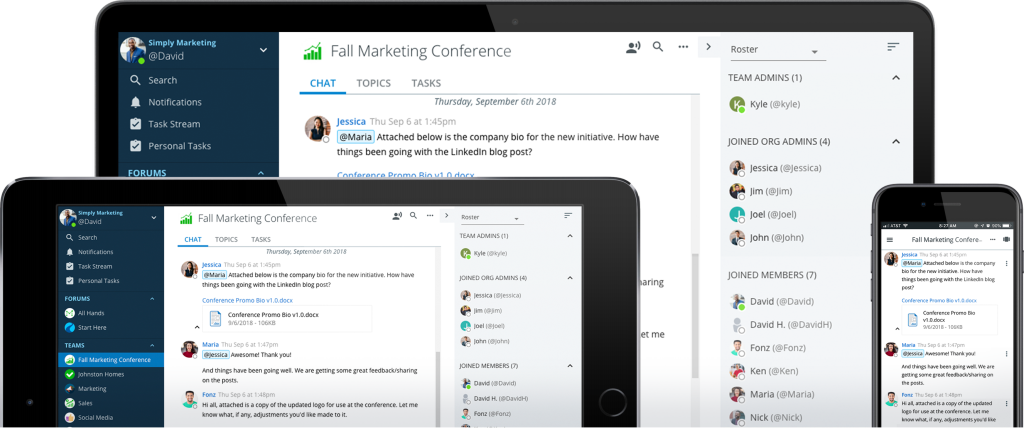
Best for: Teams that want conversations and task boards in the same platform.
Ryver combines team messaging with task management, addressing a problem we know well at Chanty: conversations often produce work, but the responsibility for completing it isn’t always clear.
Its approach brings discussions and task boards together, making it relevant to teams that want more structure than a conventional messenger provides.
Ryver vs. Slack: what’s the difference?
Ryver and Slack both support team conversations, but Ryver places task boards closer to its core messaging experience. Slack offers Lists on paid plans and a larger integration ecosystem, while Ryver combines forums, team discussions, and task management within its own platform.
For an operations team, this difference may become noticeable when requests need to move from conversation to execution. Ryver allows employees to organize related work without necessarily introducing a separate project management application.
However, Slack may remain the stronger choice for organizations that rely on specialized integrations, mature meeting workflows, or existing automations. Ryver’s calling capabilities also deserve closer examination before replacing a communication setup that already works.
Where Ryver helps
Ryver organizes communication through forums, teams, and direct messages, while task boards provide a place to track the resulting work.
An internal operations team could use this combination to coordinate requests that cross departments. Imagine preparing equipment for a new employee. The initial request might involve HR, IT, and an office manager, each responsible for a different part of the process.
The useful test is whether everyone can understand their responsibilities, find the original context, and follow the work without repeatedly asking for updates.
Where Ryver may fall short
Ryver’s pricing page labels voice and video calls as beta. For remote teams that rely heavily on meetings and screen sharing, this makes hands-on testing particularly important.
Pricing also depends on user bands rather than a universal per-user rate. Starter is listed at $69 per month for up to 12 users, with an introductory discount available. Compare the regular ongoing cost at your expected team size instead of using a temporary promotion as the basis for your decision.
Choose Ryver if: Your team wants messaging and task boards together, and its calling capabilities meet your requirements.
Google Chat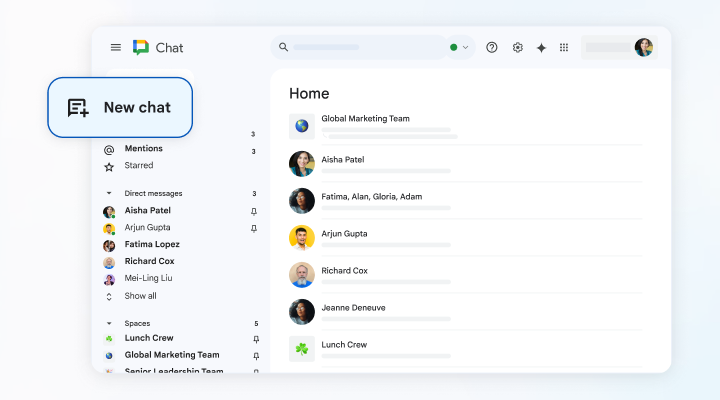 |
Best for: Teams that want communication close to Gmail, Google Drive, and Docs.
Google Chat is a natural option when much of your work already happens in Google Workspace. Instead of introducing another separate communication environment, teams can use direct messages and spaces alongside the applications they know.
Google Chat vs. Slack: what’s the difference?
Google Chat and Slack both support team messaging, but Google Chat is built around the wider Google Workspace environment. Slack offers a more independent communication hub with a broad integration ecosystem, while Google Chat works closely with Gmail, Drive, Docs, and other Google services.
For a company already using Google Workspace, this can make everyday communication feel like an extension of familiar tools rather than another separate application.
Slack may be more suitable for organizations that depend on specialized integrations or need more flexibility in how external systems connect to conversations. Google Chat is worth considering when the main priority is keeping discussions close to documents and existing Google workflows.
Where Google Chat helps
A consultancy or administrative team collaborating on Google Docs can keep conversations close to shared information. Chat also supports creating and assigning tasks in spaces, with assigned work appearing in Google Tasks.
That makes Google Chat more than a place to exchange messages, although its task management capabilities are relatively focused.
Some of its practical advantages include:
- Direct messages and spaces for team conversations.
- Integration with Gmail, Drive, and other Google services.
- Shared tasks within spaces.
- Familiar access for organizations already using Google Workspace.
For companies that primarily need communication around documents and straightforward assignments, this may be enough.
Where Google Chat may fall short
Google’s shared tasks don’t support subtasks or recurrence. If your team wants to manage repeating processes, such as weekly operational checklists, those limitations deserve attention.
External collaboration can also be more complicated than it first appears. Google documents restrictions on external space members interacting with Chat apps, which may affect agencies relying on app-driven approvals or reporting.
Personal Google Account access is available, but it isn’t equivalent to a managed business environment. Administration and other capabilities depend on the Workspace edition.
Choose Google Chat if: Your team already works in Google Workspace and its messaging, shared tasks, and external-access rules cover your needs.
Slack alternatives for project management and specialized needs
Not every company wants to replace Slack with another messenger. Sometimes the real problem is how projects are planned, how files are reviewed, or how information moves between internal and external conversations.
The following tools take a broader or more specialized approach.
Clickup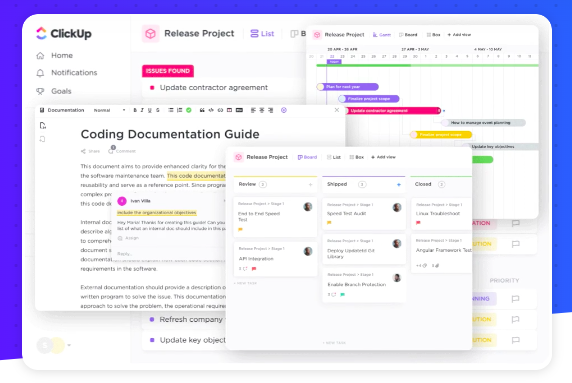 |
Best for: Teams that want conversations organized around projects and deliverables.
ClickUp approaches collaboration from the work being managed. Tasks, documents, project views, and Chat belong to a broader workspace, so adopting it can mean changing more than the place where employees exchange messages.
That can be useful for teams whose communication problems are closely connected to how projects are organized.
ClickUp vs. Slack: what’s the difference?
Slack is primarily a communication platform with task management and integrations, while ClickUp puts projects, tasks, documents, and work tracking at the center of collaboration.
This difference matters when a team needs more than a place to discuss assignments. In ClickUp, conversations can sit alongside the project structure, making it easier to connect updates with deliverables, deadlines, and responsibilities.
However, replacing Slack with ClickUp may also mean changing how the team manages projects. If your current project management software already works well, consider whether moving both communication and planning into another platform would genuinely improve the workflow.
Where ClickUp helps
A marketing team managing several campaigns needs to coordinate deadlines, documents, responsibilities, and feedback. ClickUp provides a place for those elements to live together, making conversations part of the broader project workflow.
Its features include:
- Task management with multiple project views.
- Documents and shared project information.
- Chat connected to the workspace.
- Dashboards for monitoring work.
- Guest access and collaboration permissions, depending on the plan.
For project-focused teams, this structure can make it easier to understand what needs to happen and how individual assignments contribute to a larger goal.
Where ClickUp may fall short
More functionality also means more decisions about how the workspace should operate. Someone needs to organize projects, define statuses, maintain views, and help employees understand where different conversations belong.
For a team that mainly needs everyday updates and occasional assignments, that structure may introduce more complexity than the work requires.
Agencies should also examine guest permissions carefully. ClickUp supports guest access to Chat, but available channels, direct messages, and permissions depend on roles and shared access.
Choose ClickUp if: Better project management is part of the reason you’re leaving Slack, and your team is prepared to maintain a more structured workspace.
ProofHub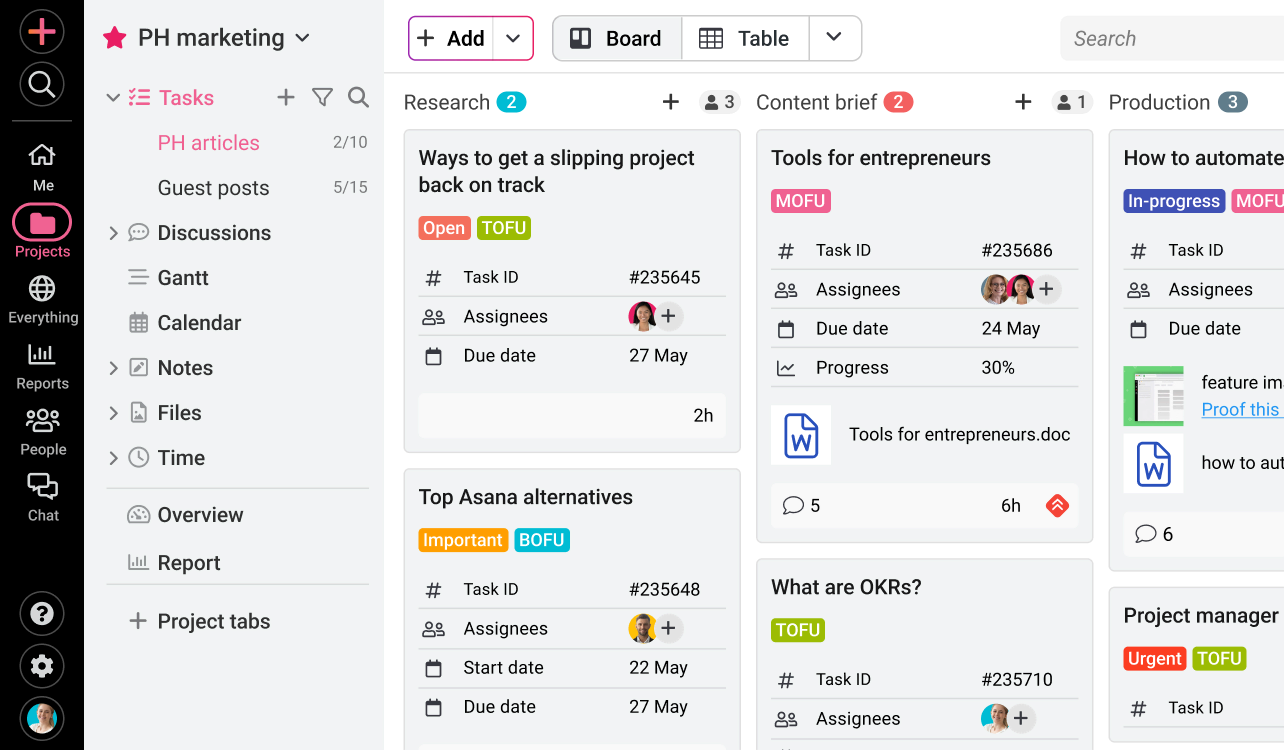 |
Best for: Project teams coordinating reviews, approvals, and delivery.
ProofHub combines communication with project planning, time tracking, and file proofing. It becomes particularly interesting when the difficult part of collaboration isn’t discussing the work, but getting it reviewed, approved, and delivered.
ProofHub vs. Slack: what’s the difference?
Slack helps teams discuss work through channels, threads, and integrations, while ProofHub is designed around managing projects from planning through approval and delivery.
For a creative agency, the distinction becomes clear during a review process. Slack can help employees exchange files and feedback, but ProofHub provides dedicated proofing tools that allow reviewers to comment directly on the work being evaluated.
That makes ProofHub a more specialized alternative when file approvals and project progress are central to daily operations. However, teams primarily looking for quick staff messaging may find Slack’s communication-first approach more familiar.
Where ProofHub helps
Imagine a creative team preparing a campaign. Someone writes the brief, a designer prepares the visuals, a manager reviews the work, and the client requests changes. If every stage happens through separate chat messages and file attachments, keeping track of the latest version can become unnecessarily difficult.
ProofHub provides more structure around that process.
Its main features include:
- Task and project management.
- Discussions connected to project work.
- File proofing with comments and annotations.
- Time tracking.
- Project planning and progress views.
The proofing workflow is particularly useful for teams reviewing designs and documents. Instead of discussing a file in a busy channel, reviewers can leave feedback near the work itself.
Where ProofHub may fall short
ProofHub’s Essential plan includes unlimited users but has limits of 40 projects and 15GB of storage. Custom roles, API access, and advanced activity logs are listed under Ultimate Control.
Those differences matter to agencies handling multiple clients or organizations that need tailored permissions and connections to internal systems.
It’s also worth testing how the platform handles ordinary staff communication. A system designed around projects may feel unnecessarily structured when someone simply needs to share an update or ask a quick question.
Choose ProofHub if: Project delivery, file reviews, and approvals are central to your collaboration problems.
RocketChat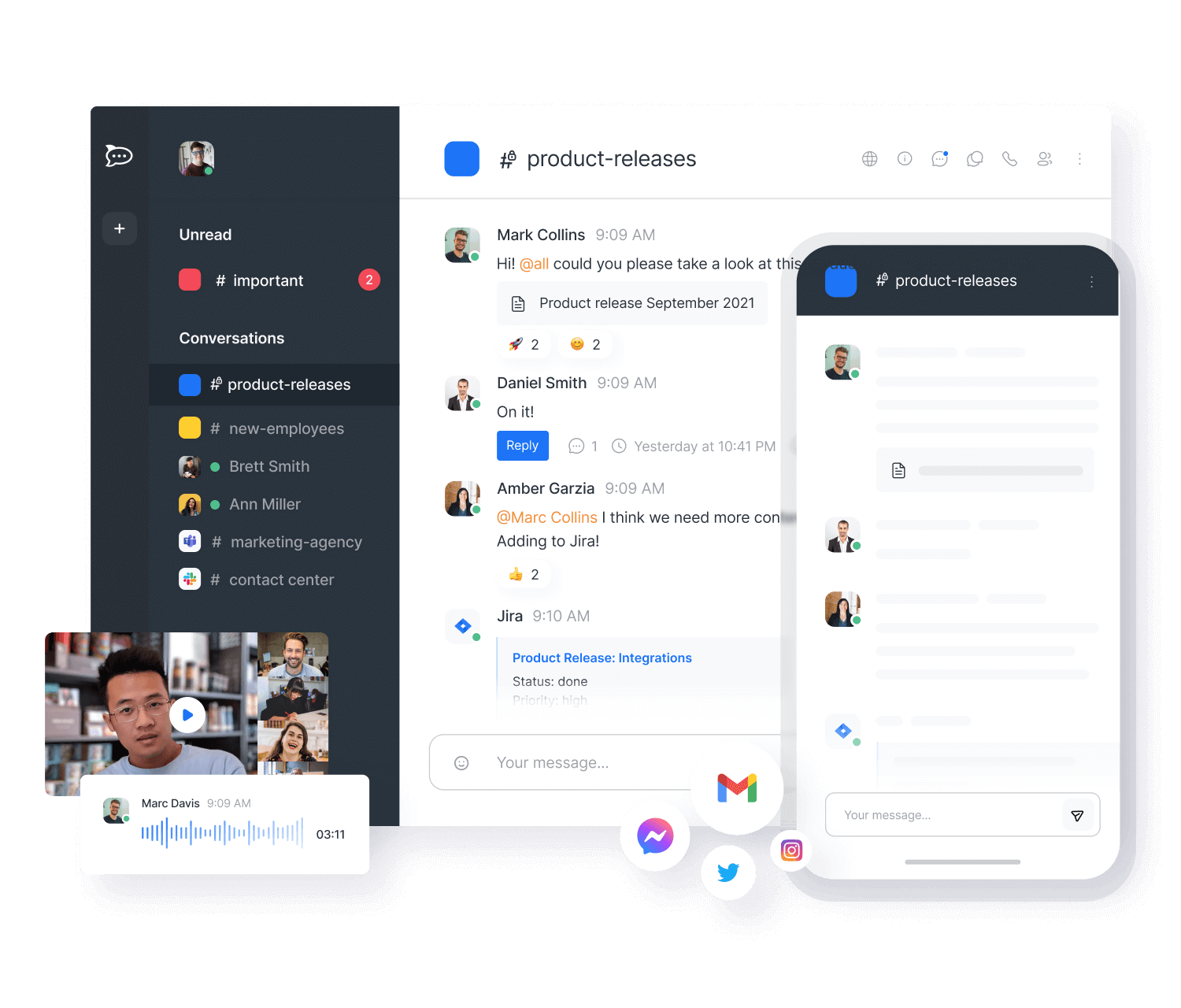 |
Best for: Organizations with specific deployment and infrastructure requirements.
For some companies, choosing a communication platform begins with a question most employees never need to consider: where will the software run?
Rocket.Chat offers an open-source foundation and deployment options that include on-premises, private cloud, and isolated environments. This makes it relevant to organizations that need more control over their communication infrastructure.
Rocket.Chat vs. Slack: what’s the difference?
The most important difference between Rocket.Chat and Slack is deployment control. Slack is a managed cloud service, while Rocket.Chat offers self-hosted and other deployment options for organizations that need greater control over where their communication infrastructure operates.
For an organization with specific data residency, infrastructure, or security requirements, that flexibility may be more important than the size of an integration marketplace.
However, greater control also means greater responsibility. Slack manages its own infrastructure, while a self-hosted Rocket.Chat deployment requires technical resources for maintenance, monitoring, updates, and recovery.
Where Rocket.Chat helps
A government contractor or organization operating under a specific infrastructure policy may not be able to use a conventional managed-cloud messenger. Rocket.Chat allows those deployment requirements to become part of the evaluation from the beginning.
Depending on the edition and configuration, organizations can explore:
- Self-hosted and other deployment models.
- Internal team messaging.
- External communication capabilities.
- Integrations and customization.
- Administration and security controls.
The appeal is flexibility, particularly for IT teams that already manage their own infrastructure.
Where Rocket.Chat may fall short
That flexibility also creates ongoing responsibilities. Updates, backups, monitoring, recovery, and security configuration need an owner, and those activities involve real costs even when the software itself has an open-source edition.
Regulated organizations should evaluate every mandatory control against the exact edition and deployment they intend to use. A feature described in enterprise documentation may not be included in a community edition, and a roadmap item cannot satisfy a requirement that exists today.
For a small business without dedicated technical resources, the additional maintenance may outweigh the benefits of self-hosting.
Choose Rocket.Chat if: Deployment control is essential and your IT team can evaluate the technical and operational commitment.
Clariti
Best for: Teams that repeatedly lose context between email and internal discussions.
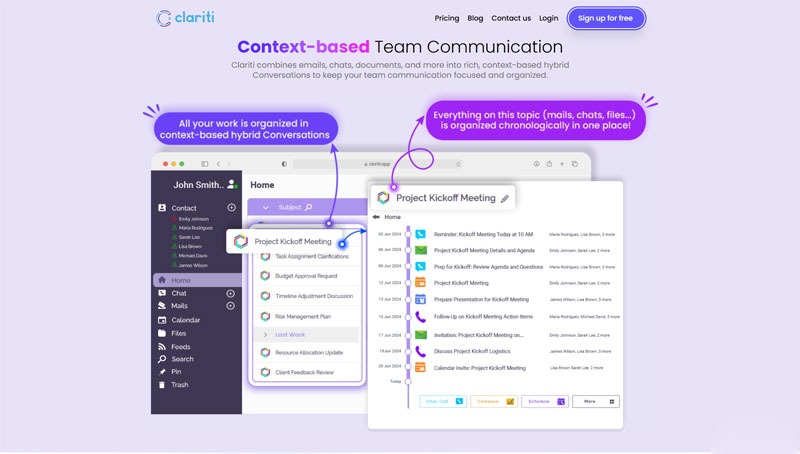
Among Slack alternatives, Clariti takes a different approach to workplace communication by connecting email, chat, files, and calls around related conversations. Its positioning also extends into customer relationships, making it more specialized than a conventional Slack replacement.
Clariti vs. Slack: what’s the difference?
Slack organizes communication primarily through channels, threads, and direct messages, while Clariti focuses on connecting related information across email and internal conversations.
This distinction matters for client-facing teams. A request may arrive by email, lead to several internal discussions, and involve documents or follow-up calls. Clariti aims to preserve that context within connected conversations, while Slack generally relies on its channels and integrations to bring information from different tools together.
For companies searching for Slack alternatives because important client details are scattered across email and chat, Clariti offers a different way to organize communication. However, teams that mainly need internal messaging and extensive third-party integrations may find Slack’s approach more suitable.
Where Clariti helps
Consider a client-services team receiving a change request by email. Employees discuss the implications internally, share a few documents, and eventually respond to the client.
The information is spread across several exchanges, and a colleague joining the project later may need to reconstruct the entire history before understanding what was agreed.
Clariti’s hybrid conversations are designed to keep related communication connected, making it easier to follow the background of a client request.
This approach can be useful for:
- Teams working across email and internal messaging.
- Client-service organizations managing ongoing conversations.
- Employees who frequently need to recover the context behind decisions.
- Workflows involving related messages, files, and calls.
Where Clariti may fall short
Connected context isn’t the same as structured task execution. A team may understand a client’s request perfectly and still need a separate system for assigning responsibilities, managing dependencies, or tracking approvals.
Organizations using an established CRM should also verify whether information can move between Clariti and their existing systems in the required way.
If client correspondence contains sensitive information, access controls, retention, export, and contractual requirements deserve careful evaluation.
Choose Clariti if: Your team frequently loses context between email and internal conversations, and its approach fits your existing client workflows.
Fleep
Best for: Teams that communicate regularly with external collaborators through messaging and email.
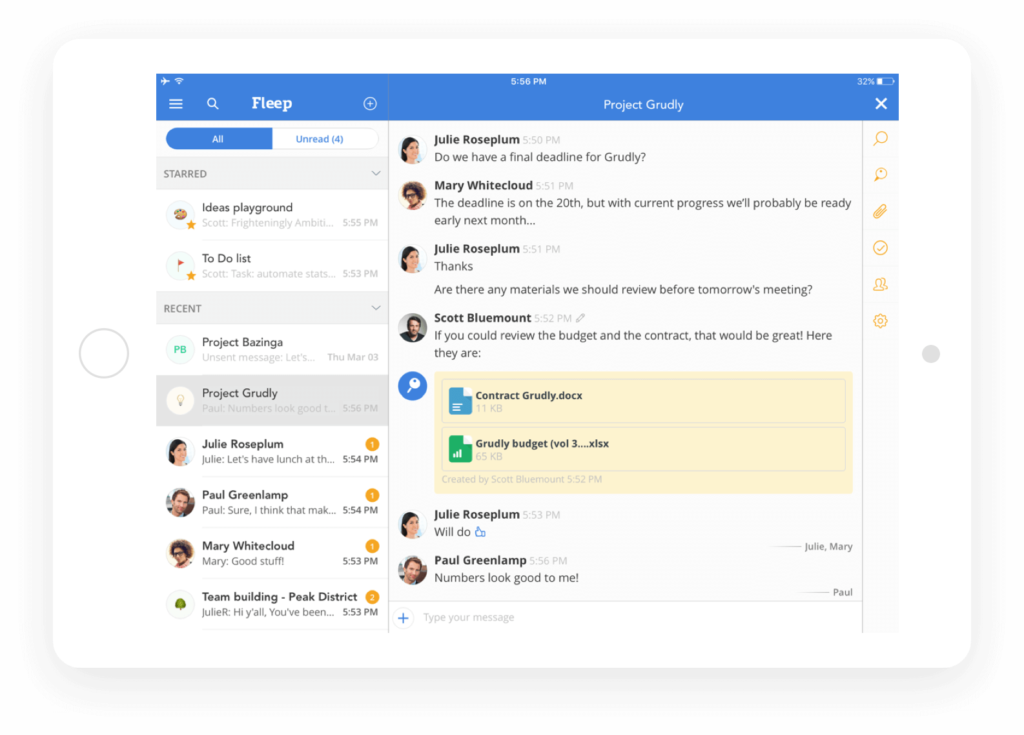
Fleep sits somewhere between traditional team chat and email. Its approach can be useful when employees frequently work with contractors, partners, or clients who don’t all belong to the same company workspace.
Fleep vs. Slack: what’s the difference?
Slack is built around shared workspaces and channels, while Fleep connects messaging with email participation. That makes Fleep an interesting alternative for teams that regularly communicate with people outside their organization.
For example, a consultancy may collaborate with contractors who use different messaging platforms or prefer email. Fleep’s approach can help bring those exchanges into shared conversations without requiring every participant to work in the same company environment.
Slack offers a broader integration ecosystem and established internal collaboration features, while Fleep places more emphasis on communication across organizational boundaries. The practical choice depends on how often external conversations need to become part of everyday teamwork.
Where Fleep helps
A consultancy coordinating work with several external specialists may want conversations to remain accessible without requiring every participant to adopt the same internal communication platform.
Fleep combines messaging with features such as:
- Email participation in conversations.
- Shared files.
- Tasks for straightforward follow-up.
- A pinboard for important information.
- Audio and video calling through an integration.
For external collaboration, the email connection is the feature worth testing most carefully. It may help teams keep exchanges together when participants have different communication habits.
Where Fleep may fall short
Fleep describes audio and video calling through a Whereby integration rather than as a native calling feature within the same subscription. Remote teams relying on daily meetings should account for that separate service’s access, limitations, and potential costs.
Administration is another important consideration. Before adding external collaborators, check who owns conversations, how access is removed, and what happens to company information when someone leaves.
Its task features may be sufficient for simple follow-up, but teams needing advanced planning or approvals should test those workflows separately.
Fleep Business is listed at €5 per user per month when billed annually, with a two-week trial.
Choose Fleep if: Connecting messaging and email solves a recurring external-collaboration problem, and its calling and administration arrangements suit your team.
Before switching from Slack
Finding an app you like is one thing. Moving an entire team into it without disrupting their work is another. A new platform may look excellent during a demonstration, but the real test comes when employees need to find old conversations, access familiar tools, and continue working without unnecessary interruptions.
Before making the switch, consider a few practical details that can save your team time, money, and frustration later.
Check what happens to your messages and files
Exporting data from Slack and importing it into another platform are separate processes, and not every application supports the same types of content. Before migrating, check what your Slack subscription allows you to export and what the new platform can actually import.
Pay particular attention to:
- Public and private channels.
- Direct messages and group conversations.
- Threads and message timestamps.
- Shared files and attachments.
- User accounts and message ownership.
Keep a secure copy of the original export and test a small migration before moving everything. Remember that if older content has already been permanently deleted, switching platforms won’t bring it back.
List the integrations your team actually uses
A platform may advertise hundreds of integrations, but that number means little if it doesn’t support the tools your employees rely on every day.
For example, your support team might receive ticket notifications in Slack, while managers use automated approval requests. If those workflows disappear after migration, employees may end up doing more manual work than before.
Make a list of your essential integrations and check whether the new platform supports the same actions. Pay attention to the difference between native integrations, third-party automation services, and custom API connections, since each may involve additional costs or maintenance.
Calculate the real subscription cost
A lower subscription price doesn’t necessarily mean lower operating costs. Some platforms offer inexpensive entry-level plans but charge more for storage, guest access, administration, or features your team considers essential.
Compare subscriptions using the same number of employees and billing period. For per-user pricing, a simple calculation is:
Monthly equivalent = paid seats × monthly-equivalent subscription rate + required extras
Remember to include automation services, migration expenses, and any additional subscriptions. If you’re considering a self-hosted platform, infrastructure and IT maintenance should also be part of the calculation.
The goal isn’t simply to find the cheapest application, but to understand what your team will actually pay to use it.
Test the app with a real team
Product demonstrations tend to show everything working perfectly, but everyday work is rarely so predictable. A better approach is to invite a small group of employees to test the platform with tasks they already handle.
Ask them to start a conversation, share a document, assign a follow-up, and find an earlier decision. Include someone who primarily works on mobile and someone who isn’t particularly comfortable learning new software.
Their feedback may reveal difficulties that aren’t obvious during setup. After all, an application that’s easy for an administrator to configure isn’t necessarily easy for everyone else to use.
Decide what success
Which Slack alternative should you choose?
There isn’t one best Slack alternative for every organization.
If your main priority is affordable team messaging with unlimited free history, Pumble is worth examining.
If you want communication connected to assigned tasks, Chanty offers a straightforward way to keep requests and responsibilities together.
If your company already depends on Microsoft 365 or Google Workspace, compare Teams and Google Chat before purchasing another standalone messenger.
For organizations that need structured project planning, ClickUp and ProofHub may offer more than a conventional chat application.
And if deployment control or customization is essential, Rocket.Chat deserves a closer look with your IT team.
The right choice also depends on what you’re leaving behind.
Slack’s integrations, external collaboration, and existing workflows may already justify its subscription. If the main problem is notification overload or poorly organized channels, changing your communication habits might be more useful than changing your software.
But if conversations repeatedly end without clear ownership, or employees need to move between several tools just to follow a simple request, it’s worth exploring a different approach.
That’s where Chanty can help.
Start with something familiar: a team conversation, a shared request, and a task that needs an owner. Turn the message into assigned work and see whether everyone can follow what happens next.
Because the real value of a communication platform isn’t simply how many messages your team can send. It’s whether those conversations help people get their work done.
Try Chanty and see how team chat and task management work together.
FAQ
What is the best Slack alternative for small businesses?
Chanty is a strong fit for small teams that want chat and built-in task management together. Pumble is relevant when unlimited free users and history are the main requirements. Teams and Google Chat deserve a look when the business already uses Microsoft 365 or Google Workspace. Compare the plan needed for your actual team size and workflow.
Which Slack alternatives offer unlimited message history for free?
Chanty and Pumble both list unlimited searchable message history on their free plans. Chanty Free supports up to five team members; Pumble Free lists unlimited users. Check storage, calls, and administration separately – unlimited history does not remove other plan limits.
Does Chanty’s free plan include video calls and tasks?
Yes. Chanty Free includes one-to-one audio and video calls, built-in task management, and message-to-task conversion for up to five team members. Group calling, screen sharing, and task boards are listed under Business. Check the current pricing page before choosing a plan.
Does Slack have built-in task management?
Yes. Slack offers Lists on paid plans. Chanty, Ryver, ClickUp, and ProofHub also provide task-management capabilities, with different approaches and plan requirements. Compare how each handles a real request, its owner, and progress rather than choosing from a yes/no feature checklist.
Can I move my Slack messages and files to another app?
It depends on what Slack allows you to export and what the destination supports importing. Check conversation types, files, threads, users, and timestamps. Run a sample import first. Do not assume that every message or file will transfer simply because an app offers migration support.
Will my Slack integrations work in Chanty?
Check each required workflow against Chanty’s available integrations. Slack connections do not automatically carry over. For a native integration, automation service, or custom connection, confirm the exact actions, permissions, and subscription requirements before switching.
Are there open-source alternatives to Slack?
Yes. Rocket.Chat is an open-source option covered in this guide. Compare the current edition, licensing terms, deployment requirements, and support arrangements. If you plan to self-host, include updates, backups, security, and administration in the decision.
When should a team stay with Slack?
Stay with Slack when its integrations, external collaboration, and existing workflows justify the subscription, or when the proposed replacement does not solve a clear problem. If notifications and channel organization are the main frustrations, try improving those settings and habits before moving the whole team.
DiscoverSlack:🔍 Review 💰 Pricing 🧑💼 Slack for Business ⚖️ Competitors 🔄 Alternatives 🛠 Self Hosted Slack Alternatives |